Action: Send HTTP request with files

Action: Send HTTP request with files

Send HTTP Request with files action allows send request that includes files.

NOTE: Action sends a POST request with a predefined Content-Type: multipart/form-data header.

Example of Send HTTP Request with files action configuration in Scheduled Actions
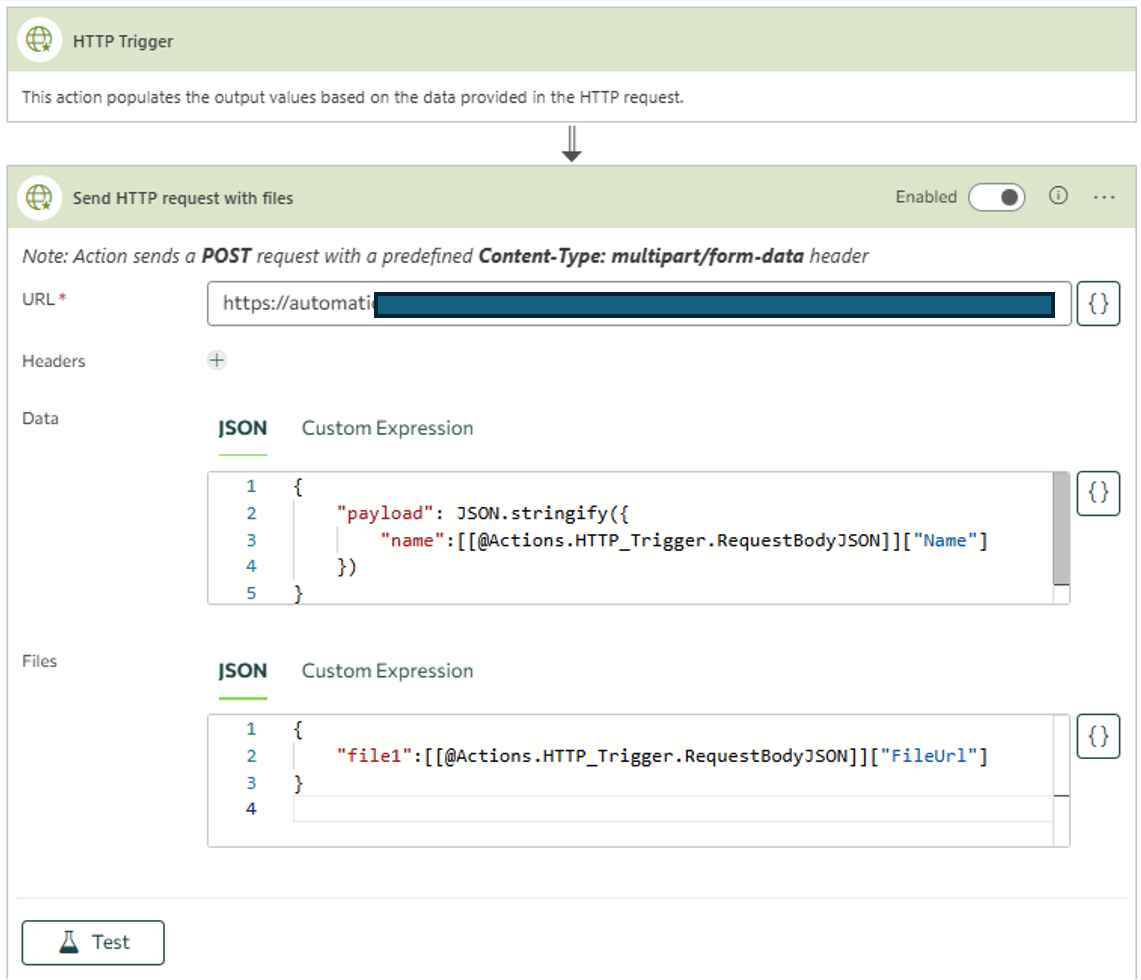


For more information about Action Builder read 
Action Builder introduction article.

When action Send HTTP Request with files is selected, the following additional properties should be specified.

Configuration

Property

Required

Type

Description

Url

yes

String

Specify an URL or expression to be evaluated as URL.

Headers

no

String

Enter any key-value pairs you need to send along with your request

Data

no

String

Data to be sent to the server

Files

no 

String

Files to be sent to the server. Files must be set in a JSON format where:
key → unique string value
value → file source (server relative URL or output from HTTP request trigger action)


Availability

Modern Forms

List Actions

Scheduled/Triggered Actions

-

-


Output

Output Parameter

Type

Description

ResponseBody

JSON object or String

Returns response value of request.


Example:


    • Related Articles

    • How to make a request with HTTP trigger type outside Teamsware Studio

      HTTP trigger type allows trigger the action/s execution by sending HTTP request outside Teamsware Studio to the automatically generated URL. How to make a request with JSON data using Postman: Method: POST URL: generated automatically during ...
    • Action Builder Introduction

      The Teamsware Studio Action Builder is a tool that allows you to specify actions which are executed in consecutive order. You can build powerful workflows triggered from a form button, on form load, from a list view, scheduled or event triggered on a ...
    • Action: Send email

      SenSend email action with extended configuration allows dynamically sending emails from your SharePoint site to any email address. Example of Send email action configuration on the current site For more information about Action Builder read Action ...
    • Action: Start Power Automate / Azure Function

      Start Power Automate / Azure Function action allows you to trigger existing Power Automate flow using "When an HTTP request is received" trigger or configured Azure Function. Example of Start Power Automate / Azure Function action configuration on ...
    • Send internal email action retirement

      Send internal email action retirement Microsoft announced the retirement SharePoint SendEmail API, known as SP.Utilities.Utility.SendEmail, which is utilized to send internal SharePoint emails. It is getting retired on October 31, 2025. This means ...